Batch Analysis & Charting
Automate batch-wise analysis, trending, control charts and process capability views so quality teams spend less time building Excel charts and more time interpreting product performance.
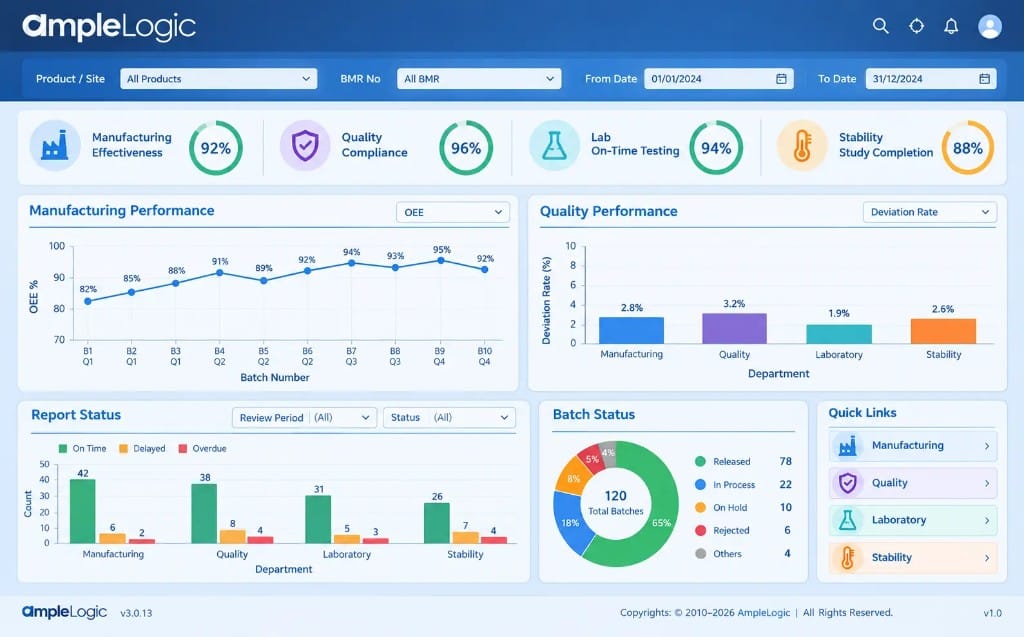
Move beyond manual chart preparation
Traditional APQR analytics often depend on exporting data, building charts by hand and pasting static images into reports. That approach is slow, hard to reproduce and easy to get inconsistent across products and sites.
AmpleLogic batch analysis and charting helps quality teams generate batch comparisons, trend views, control charts and capability analysis from the connected APQR dataset.
Reviewers can focus on signals, exceptions and product performance conclusions instead of chart formatting.
Back to Annual Product Quality Review SoftwareWhat Batch Analysis & Charting enables
Practical capabilities quality teams use to reduce manual effort and improve review visibility.
Batch-wise analysis
Review product and process performance across batches in the APQR period with structured analytical views.
Trend analysis
Identify shifts, patterns and emerging signals across batches, products and review cycles.
Control charts & visualizations
Generate APQR-ready charts and visual summaries without manual desktop charting workflows.
Process capability analysis
Support capability assessments that help teams understand process performance during the review period.
Batch and product comparison
Compare batches and related products to surface differences that matter for quality decisions.
Automated APQR charting
Reduce repetitive chart creation so analysis outputs are ready for review and dossier assembly.
How this capability fits the APQR process
From connected data through analysis, review, approval and reporting — adapted for this feature.
Step 01
Data ready
Start from connected, validated APQR inputs instead of exported workbook fragments.
Step 02
Analyze
Run batch, trend and capability analysis across the selected review period.
Step 03
Visualize
Generate charts and summaries that make product performance easier to interpret.
Step 04
Review
Use analytical outputs to support quality conclusions and investigation priorities.
Step 05
Report
Carry charts and findings into workflow review and formatted APQR output.
Outcomes quality teams can expect
Benefits focused on this capability — not a generic copy of every APQR advantage.
Faster analytical turnaround
Reduce the time spent preparing charts before quality conversations can begin.
More consistent methods
Apply common analytical views across products and sites instead of analyst-specific spreadsheet methods.
Better signal visibility
Help reviewers spot trends and exceptions earlier in the APQR cycle.
Cleaner report inputs
Feed analysis outputs directly into review and dossier steps with less rework.
Built to support regulated pharmaceutical operations
Controls and practices most relevant to this APQR capability.
Reproducible analysis
Support inspection discussions with analytics that can be regenerated from controlled data.
Traceable chart lineage
Keep a clearer path from source data to the visuals used in quality conclusions.
Batch analytics that also support CPV thinking
Batch trends, control charts and capability views created for APQR can strengthen continued process verification and ongoing process understanding.
Shared statistical language
Use consistent charting and capability concepts across periodic review and process monitoring.
Earlier process awareness
Trends identified in APQR analysis can inform what deserves closer CPV attention.
Nuestras Oficinas Globales
Estamos donde nos necesita. Conectamos a nivel global y entregamos a nivel local.
India

Melange Tower, 2nd Floor, Wing-C, Patrika Nagar, HITEC City, Madhapur, Hyderabad - 500081, Telangana, India
Estados Unidos (Dallas)

17330 Preston Road Suite 200D, Dallas, TX, 75252
Canadá (North York, Toronto)

5255 Yonge Street Suite 201, North York, ON, M2N 6P4
Australia (Melbourne)

Level 14, 330 Collins Street, Melbourne, VIC, 3000
Corea del Sur (Daegu)

Daegu Trade Centre, 8/F. 489, Dongdaegu-ro, Daegu, 41256
Irlanda (Dublín)

Block 1, Blanchardstown Corporate Park Ballycoolen Road, Dublin, D15 AKK1
Singapur

1 Scotts Road, #24-10 Shaw Centre, Singapore, Singapore, 228208
Manténgase a la vanguardia en las ciencias biológicas
Reciba las últimas actualizaciones de productos, noticias sobre cumplimiento y conocimientos de la industria en su bandeja de entrada.